
Version 1.7.3 will be rolling out on all sites from Sunday 11th January, 2026
What's New 🎊
AR-9711: New Course Prerequisite Rule – “Complete N of M”
Courses now support a new prerequisite evaluation mode: “Complete N courses from this group.” This joins the existing “ALL” and “ANY” modes, giving admins finer control over course sequencing.
The feature lets you configure groups where learners must complete a set number of courses, e.g., 4 out of 10. It integrates cleanly with existing group logic and provides clear pass/fail scenarios based on real completions.
Why did we do this?
Customers needed a more flexible way to structure course dependencies without forcing completion of every item.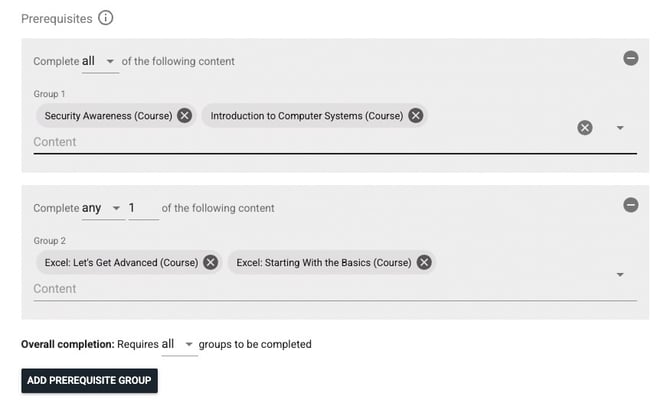
AR-9307: Passkeys Added as an MFA Method
Users can now register and manage Passkeys as part of their multi-factor authentication setup. This feature is available to organisations alongside our other MFA options. Contact our support team if you want to give your users this option for logging in.
Why did we do this?
Passkeys provide a simpler and more secure login experience, adding to our suite of login options for different organisations
Changes ✨
AR-9525: Unified Search Results Between Catalogue & Top Site Search
We resolved an inconsistency where search results in the Catalogue Search didn't match results from the Top Site Search. Previously, content visibility and indexing rules weren’t fully aligned, which caused learners to see different results depending on where they searched.
This update synchronises both search paths to respect the same logic for filtering, visibility, and access permissions.
Why did we do this?
This was a key follow-up to our recent Learning Catalogue upgrade, ensuring that the redesigned catalogue experience is consistent whether users are browsing within the catalogue or searching site-wide.
AR-8975: Breadcrumb Now Restores Filter and Scroll Position in Catalogue
The breadcrumb in the new Catalogue has been enhanced to remember both your active filters and scroll position when navigating back from a content page. Now, if a user clicks into a course or item and then returns via the breadcrumb, they’ll land exactly where they left off — with filters applied and the page scrolled to the same position.
Why did we do this?
This post-release enhancement ensures smoother navigation in the new Catalogue, helping users stay oriented and avoid repetitive filtering or scrolling when exploring multiple items.
AR-9620: Training History Gets Better Sorting
The Training History view has had its default sorting logic switched:
-
Enrolments now sort by newest enrolment date
-
External Learning entries sort by newest completion date (or fallback to record creation date)
-
Partnered Content sorts by newest date started
Other sorting options are still available by clicking on each heading, so if users want to sort alphabetically based on title, that is still available.
Why did we do this?
Sorting by recency provides more useful insights, and surfaces the most relevant information more easily.
AR-9666: Major Performance Improvements in Quiz Plus
Significant speed-ups across quiz grading, loading, and reporting—especially for quizzes with 100+ questions.
Why did we do this? To reduce wait times and provide real-time feedback.
AR-9571: Cohort Managers Can Now Run Reports Across All Cohorts
We've restored the ability for cohort managers with access to multiple cohorts to run reports across all their cohorts at once. Previously, a recent update to the role selector forced users to select a single cohort, limiting reporting flexibility.
Why did we do this?
This change brings back a valuable workflow for users managing multiple cohorts, ensuring they can generate comprehensive reports without repetitive filtering.
AR-9324: Quality of Life Improvements to Momentum Stage Picker
We’ve made several usability upgrades to the Momentum Stage Picker to streamline setup. If no stage is selected when editing a Momentum action, it now defaults to the most recently created stage. If no stages exist at all, a new one—Stage 1—is automatically created and applied.
Why did we do this?
These changes reduce friction during setup and prevent common issues where users were left with incomplete or invalid configurations due to missing stage selections.
AR-9439: Improved Colour Contrast on Activity Descriptions
Updated advanced hover states on Course and Live Learning pages so activity descriptions now meet WCAG 2.1 AA contrast standards.
Why did we do this? To improve accessibility for low-vision users.
AR-9651: Locked Forms Can No Longer Be Resubmitted in Multiple Tabs
Now prevents users from resubmitting locked forms by exploiting multiple tabs.
Why did we do this? To preserve the integrity of form submissions.
AR-9626: Team Compliance Widget Logic Aligned
The Team Compliance Status widget now uses the same logic as the main Compliance Report.
Why did we do this? To eliminate confusing discrepancies in compliance displays in edge cases.
Bug Fixes 🐞
AR-9668: Select Dropdowns Going Off-screen
Dropdowns now remain in view when activated. This occurred in the catalogue, with large lists of filters, where the filter would open downward and overflowed past the screen. We've addressed this problem, so the dropdown will now be rendered up if there is not enough space at the bottom of the screen.
AR-9687: Fixed "Latest Enrolment" Setting Affecting Due Dates Incorrectly
Corrected due date workflows to account for archived completions in non-enrolment-triggered workflows.
AR-9685: Inline “Search” Label Fails Contrast Test
Adjusted label colour to meet WCAG standards.
AR-9686: Calendar Widget Color Contrast Fails
Improved colour contrast for due and expiry date elements in compliance widgets.
AR-9684: “Mark as Read” Button Contrast Fail
Updated notification panel buttons for accessibility compliance.
AR-9664: Quiz Plus Grade Calculation for Section Grading
Final grades now correctly reflect section weighting.
AR-9636: Hidden Partnered Content Missing Content IDs
Fixed data integrity issues for hidden content records, so that they can be retrieved by new reports and similar interfaces.
AR-9595: Payment Transaction Report errors when running with the "All Tenancies" option enabled.
Resolved failure when generating site-wide reports.
AR-9539: Cleanup Campaign Records After Validation Failure
Campaigns no longer leave behind records if blocked by user limits.
AR-9368: Checkbox and Radio Label Alignment
Standardised label spacing across all checkbox and radio button styles.
AR-9268: Completions API Now Uses Central Content Table
Updated the completions API to use a more efficient central completions table.
AR-9554: Fixed Report Visibility Issue When Configuring Reports for Other Users
Resolved an issue where site admins could configure reports for a reporting officer, but the list incorrectly showed reports the officer did not have access to. The selection interface now only shows reports the target user can actually view.
AR-9625: Fixed Misleading “Error” Status in Upload Logs
Bulk user and completion uploads now display a more accurate “Processing” status during upload, instead of incorrectly showing “Error” until the job completes. This prevents unnecessary re-uploads and confusion for users monitoring upload progress.