
Version 1.7.5 will be rolling out on all sites from Thursday 26th February, 2026
What’s New 🎊
AR-9655: Phishing resistant MFA (Passkeys)
We’ve strengthened login security by expanding Multi-Factor Authentication (MFA) options and introducing the ability to require phishing-resistant passkeys (WebAuthn) at the tenancy level.
For Users
Users can authenticate using:
-
Email one-time codes
-
SMS one-time codes
-
Passkeys (e.g., Face ID, fingerprint, Windows Hello, hardware key)
After entering their username and password, users verify their identity using their selected MFA method.
If passkey enforcement is enabled, users without a passkey will be prompted to register one at login. Once set up, passkeys become the required login method, and email/SMS are limited to recovery only.
For Administrators
Administrators can:
-
Offer multiple MFA options
-
Track MFA adoption
-
Enforce passkey-only authentication for stronger security
Why did we do this?
To reduce phishing risk and provide organisations with modern, device-based authentication that is both more secure and more convenient.
AR-10145: Add ability for Course Enrolment to be managed via an Approval-Based Process
Courses can now move from instant self-enrolment to a structured, approval-based process that happens outside the platform.
When the new setting for Approval required is enabled, learners can no longer enrol immediately. Instead of gaining instant access, they are redirected to an external approval link defined by your organisation — such as an internal HR system, manager request form, compliance portal, or any URL you choose.
This means enrolment shifts from an automatic in-platform action to a manual, externally managed approval step. Access to the course is only granted after the learner completes that external process.
For administrators, this provides greater control over who can access specific training, while allowing organisations to use their existing approval systems and workflows.
Why did we do this?
To give organisations the flexibility to manage enrolment approvals using their own tools and governance processes, rather than relying solely on in-platform self-enrolment.
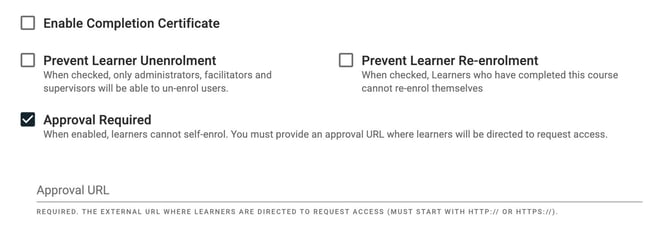
Admin view when creating or updating a course.
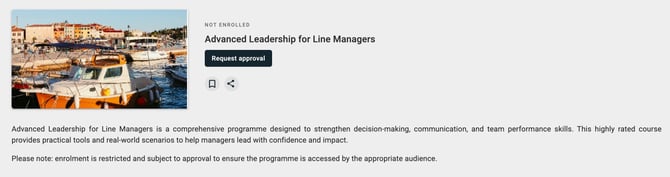
User view when accessing a course that requires approval.
AR-9811: Duplicate Capability Assessment Forms from Actions Menu
Administrators can now duplicate capability assessment forms directly from the Form List → Actions menu using a new “Copy/Duplicate” option. This allows you to quickly create a new form based on an existing one without needing to rebuild it from scratch.
When a form is duplicated:
-
The full form structure is copied, including sections, questions, settings, and configuration.
-
The duplicated form is created as a separate, editable version.
-
The new form can be renamed and modified immediately after creation.
Please note that assigned capabilities are not duplicated as part of this process. If the original form had capabilities attached, these will need to be manually reassigned in the duplicated version.
Why did we do this?
Many organisations build multiple assessments with similar structures (e.g., variations by cohort, department, or campaign). Previously, this required rebuilding forms manually, which was time-consuming and prone to setup errors. This enhancement significantly reduces administrative effort, speeds up campaign preparation, and improves consistency across assessment forms.
Changes ✨
AR-9833: Faster, More Reliable Capability Reports
Capability reports now load more efficiently, especially when working with large datasets. Users running broad or organisation-wide reports should experience fewer delays and improved stability.
Why did we do this?
To ensure reporting remains responsive and dependable, even as data volumes grow.
AR-10043: Correct Timezones Displayed in Momentum Emails
Dates shown in Momentum emails now reflect the correct timezone, ensuring users see accurate scheduling and deadline information.
Why did we do this?
To eliminate confusion caused by inconsistent date and time displays in email communications.
AR-10040: Improved Dropdown Usability on Smaller Screens
Dropdown menus now display and position correctly on smaller screen sizes, ensuring all options remain visible and selectable.
Why did we do this?
To improve usability and accessibility across devices, particularly for users working on laptops or smaller displays.
AR-9789: Smoother Select Dropdown Experience
Select inputs now transition more smoothly without content jumping or rendering outside the visible area. This results in a more polished and stable interaction when opening dropdowns.
Why did we do this?
To create a more seamless, professional user experience and prevent visual glitches.
AR-10008 & AR-10007: Updated Help Tooltips in Course & Live Learning Forms
Help tooltips in course and live learning create/update forms have been modernised to match the current interface design system. The updated tooltips provide clearer guidance and a more consistent experience.
Why did we do this?
To improve clarity, consistency, and overall usability within form workflows.
Bug Fixes 🐞
AR-10236: Course Completions Sending Incorrect Webhook Data
Fixed incorrect record type being sent to webhooks for course completions.
AR-10235: Payment Provider CSP Errors
Removed overly permissive CSP entries and added required payment gateway domains.
AR-10217: Capability Modal Displayed Hidden Proficiency Levels
Corrected modal to display only enabled proficiency levels.
AR-10195: Instructor Session Changed Email Crash
Resolved null foreach error when QR check-in was toggled on sessions without date changes.
AR-9316: “More” Button Not Keyboard Navigable
Improved keyboard accessibility for the “More” button in course and live learning tabs.