
A Subcourse is an Acorn LMS activity that links one Course to another Course or Live Learning, enabling a program-style learning experience where completion of linked content counts toward the Parent Course requirements. A course that contains a subcourse activity is often referred to as the "Parent Course". Subcourse activities can be set up to replicate a program style format that allows a user to complete other content to meet the requirements for the Parent course. This format is particularly useful for content shared across multiple Acorn instances via the Acorn-to-Acorn integration. For more information on this integration, refer to the Acorn-to-Acorn integration guide.
Follow the steps below to configure a subcourse activity:
1. Navigate to the course you intend to add a subcourse activity to, then open the Activities section. Enable editing through the admin cog.
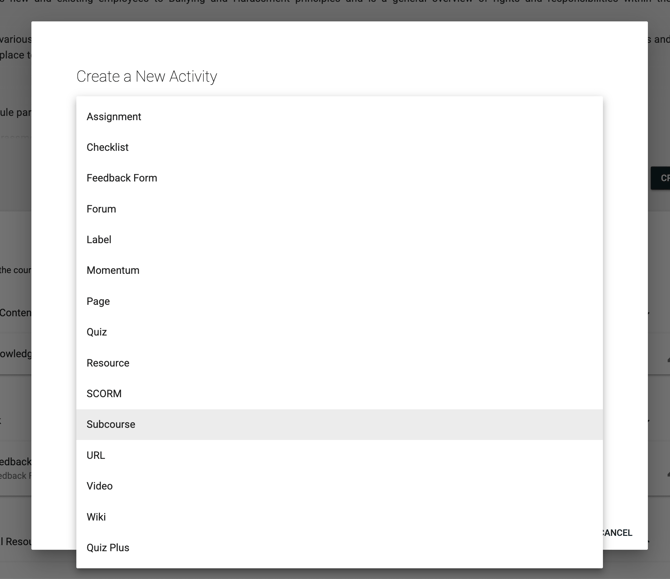
2. Select 'Subcourse' from the Activity Type dropdown.
3. Select the Course type, then select your course. You can add a description and icon if required.
4. Adjust your Course Completion Prerequisite and Completion Criteria if necessary.
5. Click CREATE ACTIVITY or UPDATE ACTIVITY at the bottom of the page.
Note: If the Subcourse activity is required for the Parent Course completion, ensure you have also configured the completion criteria for the Parent Course.
You have now successfully configured a Subcourse activity!