
Prerequisites allow you to specify content that a learner must complete before they can access a particular course. This is useful for creating structured learning paths where foundational knowledge is required first.
How prerequisites work
- A learner who has not completed the prerequisite content will see the course in the Catalogue but will not be able to start it.
- Once the prerequisite is completed, the locked course automatically becomes accessible without any admin intervention.
- Prerequisites can be applied to: Courses, Live Learnings, Videos, Resources, and Programs.
How to add a prerequisite to a course
- Open the course you want to add a prerequisite to.
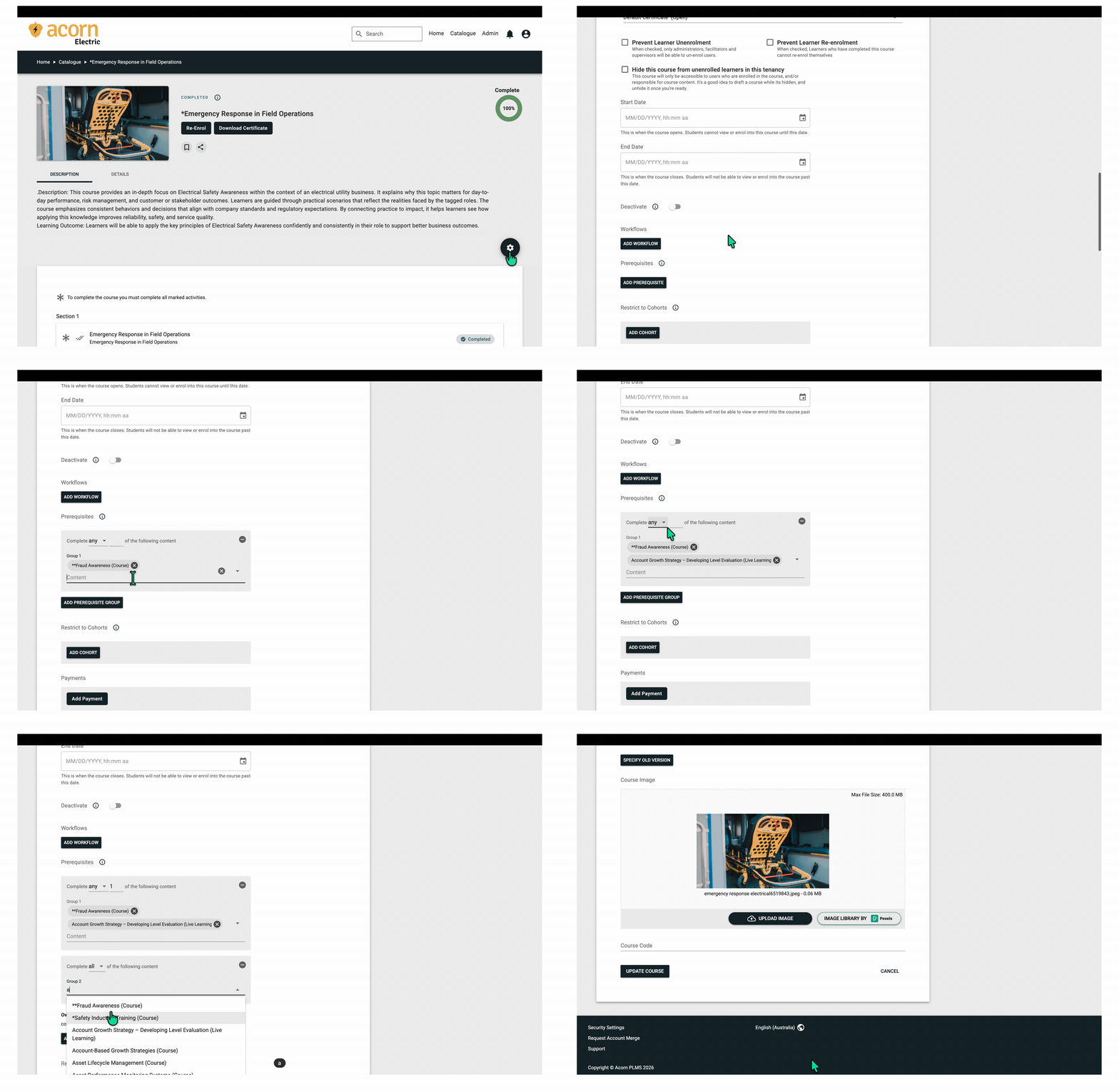
- Click the cog icon and select Update Course.
- Scroll to the Prerequisites field > Add Prerequisite.
- Select the content that must be completed prior to accessing this content. Prerequisites are ignored if a user is enrolled/registered by a facilitator or admin.
- Multiple groups can be added. It is important to pay attention to the "any" and "all" drop-downs when creating a group.
- Search for and select the content that must be completed first. Multiple prerequisites can be added — the learner must complete all of them before accessing this course.
- Click Update Course to save.
Things to keep in mind
- Archived completions count: If a learner previously completed a prerequisite course but their completion was archived by a Refresher Workflow, they may still be able to access the dependent course. Acorn checks for any completion (including archived) when evaluating prerequisites.
- Admins and Facilitators bypass prerequisites: Admin and Facilitator users can access courses regardless of whether they have completed the prerequisites. Prerequisites only apply to Learner-role users.
- Prerequisites do not affect enrolment: A learner can be enrolled in a course even if they haven’t completed the prerequisite. They just won’t be able to start the course content until the prerequisite is met.
Removing a prerequisite
- Go to Update Course for the course.
- In the Prerequisites field, click the X next to the prerequisite you want to remove.
- Click Update Course to save.